Tracking Entities
Metadatify has functionality to track physical Entities via unique identifiers and a barcode or QR code scanner.
Entity Identifiers
Every Entity, regardless of the name, has a unique identifier. This identifier is primarily used internally to store the Entity in the database, however the identifier protocol has been setup to be usable within a QR code.
Scanning QR Codes
The sidebar of Metadatify has a "Scan" button, under the "Tools" section. Clicking this button will open the scan dialog:
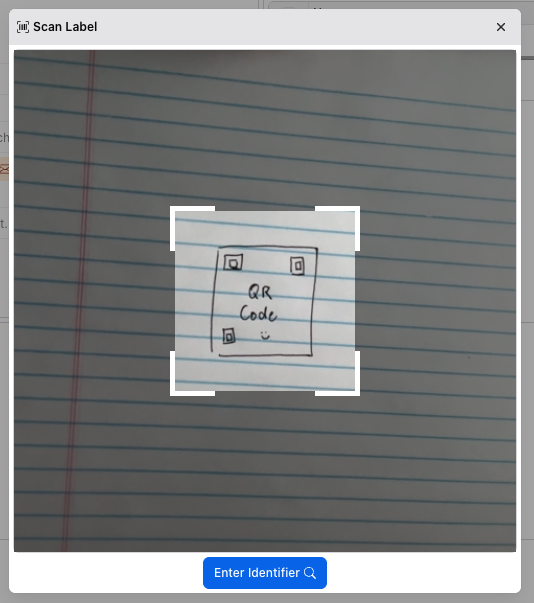
To function correctly, you will need to grant Metadatify access to your camera through the browser. It will only access the camera when the scan dialog is open.
To scan QR codes, place the QR code in view of the camera, align with the corners of the central region, and the corners will change color to green upon a successful scan. Metadatify will then navigate to the corresponding Entity.
Alternatively, the unique identifier can be entered after clicking the "Enter Identifier" button.
If a barcode scanner is available and configured to send keyboard input, it can be connected to computer accessing Metadatify via a USB cable. When connected, a successful read of a barcode or QR code will emit text input to the browser.
Generating Labels
Metadatify does not have a built-in label creation feature. However, the "Export" button on an Entity's page allows for the export of metadata in a CSV format. This CSV can be imported into label-making software.
The "Share" button under the yellow "Actions" button displays a dialog containing a QR code and a shareable link to the Entity:
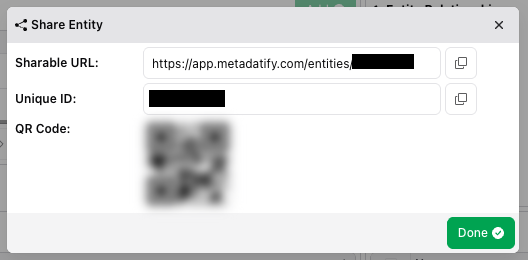
The QR code can be scanned with a barcode scanner to quickly access the Entity. The shareable link can be used to access the Entity from any device with a web browser.